5 Ways Amplifiers and Mixers Improve AV Collaboration Spaces
In AV collaboration, bad audio usually causes more frustration than bad video. Echo, low volume, and uneven coverage can derail meetings, training sessions, and huddle-room calls fast. I’ve seen people blame the conference platform when the real issue was the amplifier path. Amplifiers and mixers sit behind the scenes, making speech clear, balanced, and dependable. The good news? A right-sized setup usually isn’t overbuilt or expensive, even in a budget-conscious market.
What Amplifiers and Mixers Actually Do in a Collaboration Setup
An amplifier’s job is simple: take a low-level signal and boost it so speakers can play audio at a usable level. A mixer combines multiple sources and balances them, whether that’s a laptop, a microphone, or a conferencing codec. In real rooms, that matters because one system often has several inputs feeding one output path.
You’ll hear terms like RMS power, impedance, line-level, and gain staging, and they sound scarier than they are. RMS tells you the continuous power a unit can deliver, impedance affects how the amplifier and speakers load each other, and gain staging helps you keep the signal clean without clipping. I also think modern low-impedance digital amplifier modules are popular for a reason: they fit in compact spaces and usually run cooler. In my experience, a well-matched amp/mixer chain often solves “mystery” issues without replacing the whole system. A noisy room doesn’t always need new speakers; sometimes it just needs a cleaner signal path and a little balance. That’s why simple setups can still sound excellent. If you want a broader overview of system planning, the AV collaboration basics and the audio-first approach both connect well with this stage. A category view of collaboration audio gear can also help narrow the options.Key Features to Look for Before You Buy
When I’m helping teams choose amplifier and mixer gear, I start with the specs that actually matter: wattage, channel count, speaker compatibility, input types, EQ controls, and installation footprint. A 2-channel amplifier is often enough for a small meeting room, especially if the goal is speech clarity rather than big-room sound. Larger spaces, though, may need more flexibility, zone support, or extra mixing headroom.
DSP features can be a nice bonus because they let you tune speech intelligibility with EQ, limiting, and sometimes basic filtering. But premium options aren’t always worth it for every space. Quick Wins: check speaker impedance, confirm input sources, and make sure the unit fits the mounting location. Those three checks save a lot of rework later. Market-wise, compact, energy-efficient gear is in demand because IT teams want less rack clutter and lower power draw. Hidden installation systems are also popular in offices and education because they keep rooms looking clean and professional. If the room is open to guests or executives, that polished look matters more than people admit. I’d rather deploy a modest, well-designed system than overspend on features nobody will ever touch. For more gear context, the installed AV solutions category and vendor documentation from this manufacturer are usually worth a look.Where These Systems Deliver the Biggest Value
The biggest payoff for amplifier and mixer systems usually shows up in executive huddle rooms, classrooms, small training spaces, reception areas, and hybrid meeting rooms. Good amplification improves speech intelligibility, reduces repeated questions, and makes remote participants feel less disconnected. That’s not just a comfort thing; it saves time. When people can hear the first time, meetings move faster.
That said, a premium system is sometimes overkill, especially if the room is small and the microphone count is low. On the other hand, underpowered audio can make a cheap room feel broken. I’ve watched that happen in a weekly sales meeting where presenters switched between a laptop, a handheld mic, and a video call. A basic mixer kept those transitions smooth, and nobody had to fumble with volume knobs mid-presentation. In my experience, the best value often comes from reliable midrange gear that’s easy to support, not the fanciest spec sheet. There’s also a sustainability angle here: efficient amplification usually means less heat, less wasted power, and longer hardware life. If you’re mapping use cases to real products, the room audio category is a practical place to compare options. And if you’re thinking about broader meeting-room strategy, the collaboration audio discussion lines up nicely with this approach.How to Choose Between Compact Integration and Standalone Flexibility
The real choice is often between integrated amplifier modules and separate speaker systems with broader room coverage. Compact in-wall or module-style amps are great when space is limited and the goal is a tidy install. Meanwhile, standalone loudspeaker packages can be better when you need stronger room fill, more visible coverage, or faster deployment. If you’re trying to hide the tech, one path makes sense; if you want a room that just sounds effortlessly full, another path may be smarter.
Common decision factors include maintenance access, cable runs, source switching, and how often users will change inputs. IT teams usually prefer systems that are easy to document and service later, because nobody enjoys guessing which cable does what during a support call. Future growth matters too. Buying for today only can create headaches when the room expands or the use case changes. A few years ago, I’d lean toward whatever fit fastest. Now I’m a little more cautious. I want the system to be supportable six months from now, not just impressive on day one. That usually means balancing simplicity with a little headroom. If you want a practical shortlist, the AV setup category and vendor lineup can help you compare compact integration against fuller speaker-based designs.Vision TC3 50w 2.0 Channels Home White vs Vision TC3-AMP+SP-1800 Loudspeaker 3-Way White Wired 50 W
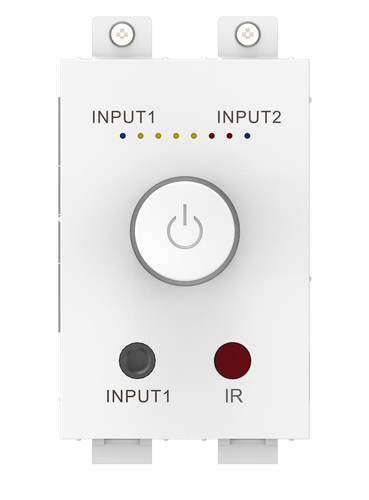
When comparing the Vision TC3 50w 2.0 channels Home White with the Vision TC3-AMP+SP-1800 loudspeaker 3-way White Wired 50 W, the main difference is how you want the room to behave. The TC3 50w 2.0 channels unit is a compact amplifier module using low-impedance digital amplifier chip technology, delivering 2 x 25 watts RMS at 8 ohms. That makes it a strong fit for smaller collaboration spaces or hidden integration setups where clean design matters.
The TC3-AMP+SP-1800 package goes a different direction. It pairs amplification with professional wall-mounted 3-way loudspeakers, which gives you richer, more powerful sound and a simpler turnkey install. I’d usually recommend the first option for discreet conference-room builds, while the second works better in training rooms or offices that need fuller sound without piecing together separate components. So, wattage isn’t the whole story. Installation style, serviceability, and room goals matter just as much. If you like compact flexibility, go modular. If you want visible coverage and less guesswork, the bundled route is often easier.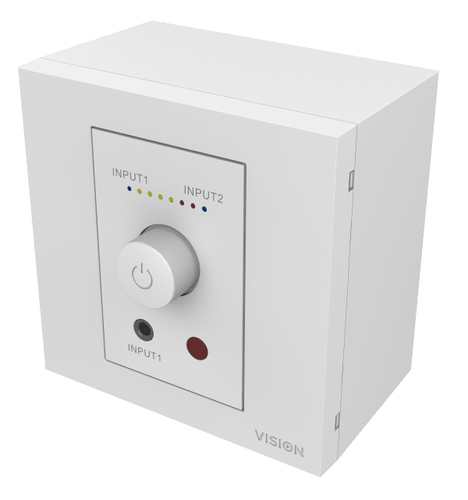

How to Set Up a Simple AV Collaboration Audio System
Start by confirming the room size, source list, and speaker load. Then choose the amplifier or mixer based on impedance and channel count. Next, connect your sources—a PC, wireless mic receiver, or conferencing codec—and route the output to the speakers. Check polarity, test volume at the farthest seat, and adjust gain staging plus EQ for speech clarity.
Common mistakes? Overpowering small speakers, leaving input levels too hot, or skipping a real-world listening test. Those issues are easy to miss on a spec sheet. My pro tip: label cables and document settings before the room goes live. A 10-minute test with actual meeting content is usually more useful than another round of debate over wattage. Simple steps save IT time, reduce user confusion, and make support calls a lot less painful.Conclusion
The best amplifier or mixer is often the one that disappears into the background because everyone can hear clearly without thinking about the gear. That’s really the goal in AV collaboration: clean speech, stable levels, and a setup that supports the meeting instead of distracting from it. When the specs are matched to the room, the system usually feels effortless.
I’d keep one thing in mind: premium isn’t always better. Sometimes a modest, well-chosen solution beats an expensive overbuilt one, especially in smaller rooms or leaner IT environments. Think about future flexibility, maintenance, and user experience, not just raw power. A setup that’s easy to support will almost always save more time than a flashy one with extra features nobody uses. If you’re planning a new room or fixing an underperforming one, compare the options with your real workflow in mind. Choose the setup that keeps meetings moving, audio clean, and support tickets low—then take a look at the collaboration audio category and build from there.Frequently Asked Questions
Common questions about Amplifiers & Mixers