Which Headset Fits Your AV Collaboration Style Best?
When was the last time a bad headset derailed a meeting, training session, or even a gaming-style collaboration setup? In hybrid work, that happens more than people admit. Headsets are small, but they shape voice clarity, noise control, and focus. Many teams still assume laptop mics or speakerphones are “good enough,” yet a solid headset usually cuts friction fast and keeps everyone on task. In this post, we’ll look at features, use cases, and headset options by category that actually fit real workflows, not just spec-sheet hype.
What Makes a Good Collaboration Headset, Anyway?
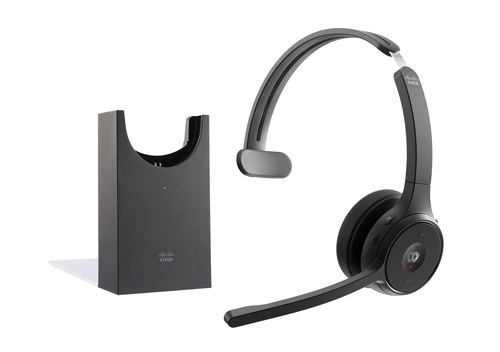
A good collaboration headset usually comes down to four things: microphone quality, comfort, connectivity, and audio isolation. If the mic has decent noise canceling, speech stays clean even when the office gets noisy. Wide frequency response can help voice sound natural, while low-latency wireless keeps people from talking over each other. Wired, wireless, and Bluetooth all have a place, but each one has tradeoffs. Wired is simple and dependable; wireless gives you freedom to stand, stretch, or pace during calls; Bluetooth is handy, though pairing and codec quirks can get annoying.
Pro Tip: comfort matters more than branding. Lightweight headbands, adjustable earcups, and balanced clamp force often make the difference between a headset people wear and one they leave in a drawer. I’ve seen premium models flop because they felt heavy after an hour, while a plain USB headset won the day because it was easy, stable, and quiet. That’s the real value: less friction, fewer interruptions, and smoother collaboration. If you’re comparing gear, start with the basics and then browse the broader collaboration audio category before paying extra for features you may never use.Why Connectivity Choices Can Make or Break the Experience
Connectivity sounds boring until it breaks your day. USB-A is usually the easiest choice for office rollouts because it’s plug-and-play, consistent, and friendly to IT support. Bluetooth works better for people jumping between a laptop, phone, and tablet, especially in flexible work setups. Wired analog can still be solid for legacy systems, and hybrid wired/wireless designs offer a nice middle ground for power users. The best connection method affects deployment speed, compatibility, and user satisfaction more than most buyers expect.
Common Mistakes to Avoid: buying wireless without checking battery life, skipping OS compatibility tests, and ignoring mute behavior in Teams, Zoom, or softphones. Those little issues create real support tickets. Dongle loss is another classic headache, along with driver conflicts and pairing drops. I’ve had teams swear a headset was “bad” when the problem was just default input settings. If you’re building a full setup, the right audio accessories for collaboration spaces often complement the headset decision and make the whole system feel more polished. In the end, the best connection is the one that fits the workflow—not the one with the loudest marketing.How Comfort and Daily Wear Shape Long-Term Value
Comfort is not a luxury feature; it’s a productivity feature. Weight, headband pressure, ear cushion material, and mono versus stereo design all affect whether people actually keep a headset on. In a shared office, a support desk, or any call-heavy role, a headset that feels fine for 10 minutes can become a nuisance after two hours. That fatigue adds up fast, and suddenly people start taking it off between calls, which defeats the point.
A lightweight headset can reduce strain during back-to-back meetings, while a monaural model keeps one ear open for office chatter, doorbells, or quick side conversations. That’s useful in reception, dispatch, and multitasking workstations. I also like to look at durability: replaceable ear cushions, sturdy hinges, and proper cable strain relief usually mean less waste and a lower total cost of ownership. Quick Win: test a headset during a real workday, not just in a quiet room. Real comfort shows up under load. Also, don’t overlook the headset and audio gear category when comparing build quality and replacement options. In my experience, teams sometimes spend more on a premium model only to settle on the midrange one because it simply gets worn more often. That’s usually the winner.Use Cases That Show the Real-World Difference
The right headset pays off differently depending on the job. In hybrid meetings, a good mic helps people sound present even when they’re dialing in from home. In gaming-style team collaboration, fast voice pickup and comfortable wear matter because users stay active for longer sessions. Customer support teams often want predictable audio, easy mute control, and a design that survives daily use. Training sessions and open offices add another wrinkle: background noise.
A lightweight wireless headset helps presenters move naturally during demos, while a wired office headset is often better for bulk deployment and steady, everyday calls. More organizations now want one headset that handles calls, media, and multitasking across devices, especially as softphone adoption and UC platform use keep growing. That trend isn’t slowing down anytime soon. Seasonal buying also matters; budget cycles and back-to-school periods usually bring refreshes, and that’s when people notice audio problems most sharply. Modern collaboration is less about fancy features and more about reducing tiny annoyances. Better voice pickup, fewer dropouts, and smoother device switching can save time all week. If you’re mapping out a full rollout, the headset should match the user’s day, not just the device shelf—and pairing it with smart collaboration audio planning can help.Razer BlackShark V3 X HyperSpeed vs HP Poly Mission 415: Which Fits Your Workflow?
If you want flexibility, the Razer BlackShark V3 X HyperSpeed is the more feature-rich pick. It supports wired and wireless use, adds Bluetooth, and offers a 20–28000 Hz frequency response, which gives it a wider audio range for immersive calls, media, and play. At 270 g, it stays relatively light for a multi-mode headset, and that makes it a strong fit for people who move between work and gaming without wanting to swap gear. For readers who want to explore the ecosystem, Razer’s official headset lineup shows how the brand leans into flexible, premium multitasking.
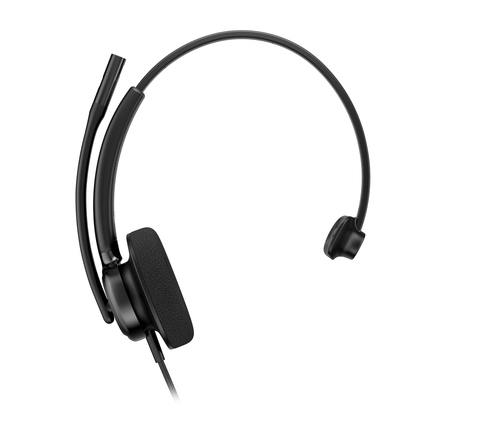
By contrast, the HP Poly Mission 415 Monaural USB Wired Headset is built for dependable productivity. It’s bulk-friendly, simple to deploy, and focused on clear monaural communication. No battery anxiety, no pairing drama, no extra steps. That makes it a smart choice for office teams, support desks, and standardized rollouts where consistency matters more than bells and whistles. If I were outfitting a mixed environment, I’d probably give Razer to gaming-oriented collaborators, creators, or home users who want more mobility—and HP Poly to teams who just need clean, steady voice performance all day.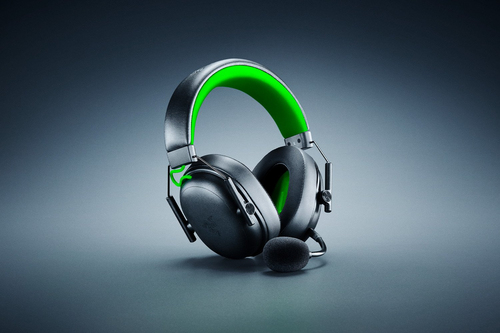
How to Choose the Right Headset Without Overthinking It
Start with the job. Is this headset for meetings, gaming collaboration, support calls, travel, or mixed use? That answer narrows things fast. Step 2: choose a connection type based on device count, workflow, and whether charging a battery is acceptable. Step 3: check microphone performance, comfort, and software compatibility with UC apps or softphones. Step 4: compare weight, earcup style, and mono versus stereo design.
Step 5: test a short list in a real environment—a noisy office, home office, or shared desk, not just a silent conference room. Step 6: review warranty, replacement parts, and total cost of ownership, because sticker price rarely tells the whole story. A practical tip: update firmware, confirm default audio input/output settings, and verify mute behavior before the first big call. That one step saves a surprising amount of embarrassment. If you keep the process simple, the decision gets easier. The best headset is the one people will actually wear all day, not the one that looks most impressive in the box.Conclusion
Headsets may be small, but they have an outsized impact on AV collaboration. The big decision points usually come down to three things: connectivity, comfort, and use case. Specs matter, sure—but daily experience matters more. If a headset makes meetings clearer, reduces distractions, and stays comfortable through the last call of the day, it’s doing its job. And honestly, premium isn’t always better. Sometimes a simpler wired model or a lighter design is the smarter buy, especially for teams that value reliability over extras. Different roles may need different headsets, and that’s completely fine. A support desk, a presenter, and a hybrid worker won’t all want the same thing. So compare the options, match them to real workflows, and choose the model that helps people communicate without fuss. If you’re ready to narrow it down, explore the headset category that fits your collaboration needs and start with the gear that makes everyday work feel easier. What’s the one headset feature you’d never want to give up now?
Frequently Asked Questions
Common questions about Headsets