Is the MacBook Pro M4 Pro 16-inch Worth It for Power Users?
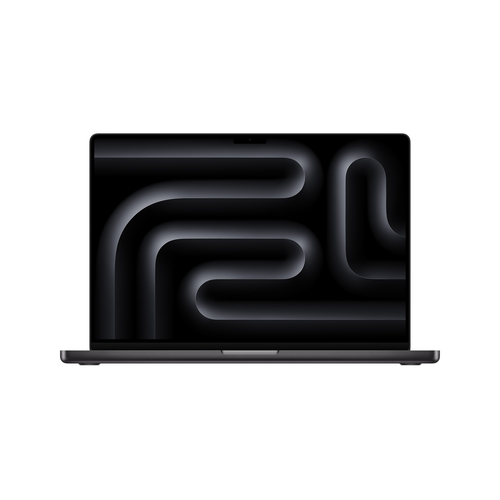
If your laptop has to juggle video calls, creative apps, multitasking, and long stretches away from the charger, the Apple MacBook Pro M4 Pro starts sounding pretty appealing. This premium clamshell brings a 16.2-inch Liquid Retina XDR Mini LED display, a 14-core M4 Pro processor, a 20-core Apple GPU, 48 GB unified memory, and 512 GB SSD into one tidy package. Apple Intelligence adds private, fast on-device workflows too. See the full MacBook Pro specifications and Apple’s MacBook Pro overview. This guide breaks down what it does well, who it suits, and whether the price feels sensible in real life.
What the M4 Pro and 48 GB of Memory Actually Mean
The M4 Pro chip here is built for demanding multitasking, not just email and spreadsheets. With 14 cores under the hood, the MacBook Pro M4 Pro can keep a dozen browser tabs, Slack, meetings, and Adobe tools moving without the usual stutter.
48 GB of unified memory is the bigger story, though. In my experience, memory is often the difference between a workflow that feels smooth and one that constantly hits a wall. If you edit large photo libraries, run virtual meetings while switching between docs, or keep design and development tools open together, that extra headroom matters. The 20-core integrated Apple GPU also helps a lot with media work, render previews, and graphics-heavy apps, usually without the need for a separate graphics card. That is a real benefit because it cuts complexity and keeps the machine quieter and more efficient. If you only need email, streaming, and documents, this is probably overkill. But for power users, this M4 Pro configuration can feel like removing a bottleneck from the entire day. It is the kind of setup that quietly saves time every hour.Why the 16.2-Inch Display Changes the Day-to-Day Experience
The 41.1 cm 16.2-inch Liquid Retina XDR Mini LED screen is one of those features people underestimate until they live with it. At 3456 x 2234, you get more room for timelines, spreadsheets, code, and side-by-side windows, which is a huge win for productivity.
Mini LED backlighting brings strong contrast and a bright XDR viewing experience, so photos and video look punchy without feeling exaggerated. It is especially useful if you work near a bright window, under office lighting, or in a café where glare usually becomes annoying fast. I also think a good display lowers fatigue over a long day, and that is something buyers often notice only after a week or two. Imagine reviewing content on the train, editing a product shot at lunch, or presenting a design to a client—the screen just makes those moments easier. If you want to sanity-check the panel and hardware details, display and hardware specs keeps everything in one place. The display is one of the strongest reasons this MacBook Pro feels premium immediately. It simply makes everyday work feel calmer and more confident.Battery Life, Connectivity, and the Little Things That Save Time
Battery life is where the MacBook Pro M4 Pro starts feeling like a serious all-day machine. Apple’s claim of up to 24 hours is best-case, of course, but even with real-world use, this class of laptop usually outlasts most Windows rivals.
The 100 Wh battery and 140 W charging support signal that this machine is built for travel, remote work, and days when you do not want to hunt for an outlet. That matters more than people think. Students, consultants, and hybrid workers all feel the difference. Connectivity is solid too: Wi-Fi 6E and Bluetooth 5.3 usually mean lower latency, steadier accessory links, and fewer random headaches with headsets or peripherals. The 12MP Center Stage camera is another practical upgrade, especially for video meetings that still dominate modern work. macOS Sequoia also fits neatly into the Apple ecosystem, so iPhone, iPad, and AirPods users tend to get a smoother experience. You can verify the exact setup in the connectivity, battery, and camera details. That said, battery claims are always idealized. On the other hand, this MacBook still tends to deliver excellent endurance and dependable day-to-day convenience.Who This MacBook Pro Is Best For—and Who Should Pause
The MacBook Pro M4 Pro is a strong fit for creative professionals, developers, analysts, content creators, and anyone who values a top-tier display with quiet, sustained performance. The black clamshell design looks clean and professional, which matters in client-facing environments more than people admit.
At the same time, the tradeoffs are real. A 512 GB SSD can feel tight if you keep huge local media libraries, and the premium price is hard to justify for light workloads. If you mostly write, browse, and stream, a less expensive MacBook—or even a different thin-and-light business laptop—may be the smarter buy. Readers who want a more travel-first setup may prefer the slimmer hybrid work approach, while this MacBook is really about sustained power and a better display. I’ve seen plenty of teams choose a cheaper laptop and then outgrow it fast; that frustration costs time. Apple laptops usually age well, though, so paying more upfront can make sense if you plan to keep it for years. Premium doesn’t always mean best, but for the right user, it often does mean easier work and fewer compromises.Honest MacBook Pro M4 Pro Review: Strong, Fast, and Not Cheap
After using similar high-end laptops on real projects, my honest read is that the MacBook Pro M4 Pro feels excellent for the right buyer. The pros are easy to list: fast performance, a gorgeous 16.2-inch XDR display, strong battery life, premium build quality, and a capable 12MP Center Stage camera. The 48 GB memory configuration makes multitasking feel almost effortless, and the 20-core GPU helps creative workflows stay smooth.
The downsides are just as clear. The price is high, the 512 GB SSD can get tight for video editors or photographers, and the size may be more laptop than some people want to carry every day. In real life, though, it shines in the moments that matter: editing 4K clips, running multiple productivity tools, working from a café, or sitting through long Zoom calls without worrying about charging. My take? If you need power and polish, this is an easy machine to like. If you are a casual buyer, it is probably more than you need. But if the budget fits and your workflow is demanding, this exact MacBook Pro setup usually feels worth it very quickly.How to Set Up the MacBook Pro for Day-One Productivity
Getting set up well on day one saves a lot of friction later. Step 1: fully charge the laptop with the 140 W adapter before first use. Step 2: sign in with an Apple ID and let macOS Sequoia finish its prompts. Step 3: update the operating system and key apps right away so security and compatibility stay current.
Step 4: enable iCloud, set up Find My, and turn on Apple Intelligence features if they are available in your region and language. Step 5: trim the Dock, notifications, and trackpad gestures so the interface feels clean. Step 6: connect Wi-Fi 6E and Bluetooth accessories, then test the 12MP camera on a quick call. A good pro tip: keep energy settings sensible and storage clean, especially if the 512 GB SSD is shared across large projects. Common mistakes? Importing too many files on day one and skipping updates. If you set it up like a work tool, not a toy, it pays you back fast. That is usually the difference between a fancy laptop and one that actually improves your day.Conclusion
So, is the MacBook Pro M4 Pro worth it for power users? In many cases, yes. This is a premium laptop built around real productivity: 14-core M4 Pro performance, 48 GB memory, a 16.2-inch Mini LED display, Wi-Fi 6E, Bluetooth 5.3, and a polished black clamshell design that looks right at home in the office or on the road.
It is not the cheapest option, and it will not make sense for everyone. Basic users usually will not need this much horsepower, and that is fair. But for creators, developers, analysts, and anyone whose time has real value, the speed and comfort can add up quickly. You spend less time waiting, less time managing memory pressure, and less time fighting your laptop. That is a meaningful return. If you are comparing options, weigh your workflow honestly and look closely at the specs before deciding. When you are ready, explore the product details page and see whether this MacBook Pro matches the way you actually work.Frequently Asked Questions
Common questions about Apple MacBook Pro Apple M M4 Pro Laptop 41.1 cm (16.2") 48 GB 512 GB SSD Wi-Fi 6E (802.11ax) macOS Sequoia Spanish Black