Is the Acer TravelMate P6 the Right Thin-and-Light Business Laptop for Hybrid Work?
The Acer TravelMate P6 is built for people who work everywhere, from desks to gate lounges, and it feels that way immediately. With Intel Evo, Windows 11 Pro, and a thin 14-inch chassis, it makes a strong first impression without looking flashy. If you need a laptop that can handle client meetings, airport Wi-Fi, and nonstop calls, this one is worth a close look. You can find the full configuration here and compare Acer’s broader business lineup on the Acer official website.
Why the TravelMate P6 feels so easy to carry and use all day
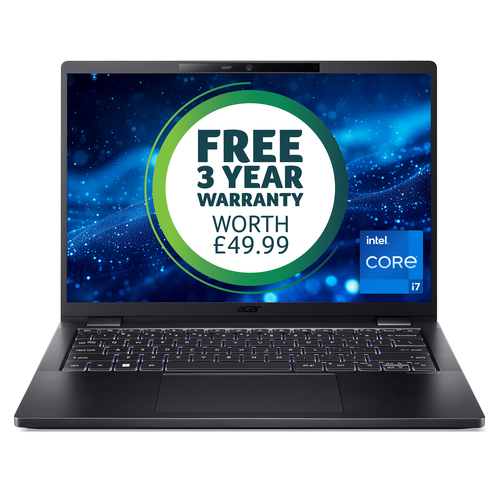
The TravelMate P6 gets a lot right before you even open the lid. Its 14-inch WUXGA IPS SlimBezel display uses a 16:10 aspect ratio, which gives you extra vertical space for spreadsheets, documents, and the endless browser tabs that seem to follow modern work everywhere. That taller layout sounds small on paper, but in practice it usually means less scrolling and fewer distractions.
The slim-bezel design helps the laptop feel compact and modern, while the black clamshell finish keeps it professional without trying too hard. I’ve found that a thin-and-light business laptop matters most when you’re already carrying a charger, a notebook, maybe a headset, and too many adapters. Every ounce starts to matter. The WUXGA 1920 x 1200 resolution hits a sweet spot, too: sharp enough for crisp text, but not so demanding that it tends to chew through battery life for no reason. If you’re considering the 14-inch WUXGA TravelMate P6 configuration, the comfort factor is easy to overlook at first and hard to give up later. In my experience, users who value mobility usually notice the difference after the first week. Fewer bag headaches, less visual clutter, and a screen that’s easier to live with during long work sessions—that’s the real win.How the Intel Core i7-1355U and LPDDR5 memory keep work moving
Performance on the TravelMate P6 is very much about being quick, efficient, and calm under pressure. The Intel Core i7-1355U with 10 cores and Intel Evo Design gives the laptop the kind of snap that business users notice right away—fast app launches, smooth window switching, and good power management. It’s not trying to be a desktop replacement. It’s trying to stay responsive all day.
The 16 GB of LPDDR5-SDRAM is a practical amount for the kind of workloads most people actually run: email, Teams or Zoom, slide decks, document editing, CRM tabs, and the occasional light creative task. Add the 512 GB PCIe NVMe SSD, and you get boot times and file access that feel quick enough to keep you in the flow instead of waiting on the machine. If you open a dozen browser tabs, join a call, and keep Excel open beside them, the TravelMate P6 usually keeps its cool. Intel Iris Xe Graphics handles office work, streaming, and everyday visual tasks without drama. It’s not a workstation GPU, and that’s fine—this class of laptop rarely needs one. For professionals who want speed without a chunky chassis or constant fan anxiety, the full hardware specifications make a strong case. Market-wise, we’re seeing more buyers choose efficient CPUs and thinner designs instead of overbuilt laptops, and honestly, that trend makes sense. This configuration lands in that sweet spot: fast enough, quiet enough, and efficient enough for real hybrid work.Battery life, connectivity, and security that fit modern hybrid work
This is where the TravelMate P6 starts feeling like a real business companion. The 65 Wh lithium-ion battery, paired with the efficient Intel Evo platform, is designed for long workdays and fewer charger breaks. Of course, runtime changes with brightness, apps, and how many video calls you take, but the goal is clear: practical all-day use instead of battery babysitting.
Wi-Fi 6E and Bluetooth 5.1 are the kinds of upgrades that don’t sound exciting until you’re working in a crowded apartment, hotel, or conference room. Wi-Fi 6E can be a noticeable improvement when bandwidth gets tight, and that’s more common than people think. In my experience, wireless stability is one of those invisible features that saves you from a bad day. Windows 11 Pro adds the security and management tools business users usually care about—device policies, login protections, and stronger admin control. The SED SSD is another plus for buyers who think about data protection. If you want a deeper look at the battery, wireless, and security specs, this model is easy to assess on paper and even easier to appreciate in daily use. And if you’re comparing that to the hybrid-work angle discussed in this related guide, the value picture becomes pretty clear. Premium business laptops aren’t always worth it for everyone, but when reliability and secure access matter, the benefits show up fast.What this laptop is best for—and where it may not be the perfect fit
The TravelMate P6 is a smart match for consultants, managers, sales reps, remote employees, frequent travelers, and students in demanding programs who need a business-class machine that won’t weigh them down. Picture an airport gate, a hotel room, or a meeting room shuffle from one floor to another—that’s where this laptop makes sense. It’s easy to carry, quick to open, and discreet enough to blend in anywhere.
That said, not everyone needs this level of polish. Someone who mostly browses the web or writes notes might be perfectly happy with a lower-cost laptop. On the other hand, a designer or video editor will probably want more graphics muscle than integrated Intel Iris Xe can offer. If you’re looking at the full product configuration, ask yourself whether portability, battery efficiency, and security matter more than raw specs. I also like that efficient hardware supports a more energy-conscious workflow. Fewer charging cycles, less wasted power, and less heat in the bag—small things, but they add up. Yes, this is a premium business machine, so the price may feel steep if you don’t need the benefits. Still, fit matters more than hype. Sometimes the best laptop is simply the one that disappears into the workday and gets out of the way.Honest TravelMate P6 review: strong everyday performance with a few tradeoffs
My honest take: the TravelMate P6 is a very good business laptop, especially if you live in hybrid work mode. It’s thin, light, and easy to carry, and the 14-inch WUXGA display is genuinely productive for everyday office tasks. The Intel Core i7-1355U, 16 GB LPDDR5 memory, and 512 GB SSD make it feel fast and responsive in real use, not just in spec sheets. For office apps, multitasking, and remote meetings, it usually performs with confidence. The tradeoffs are real, though. Integrated graphics mean it’s not built for heavy gaming or advanced media production, and premium business pricing can be hard to justify for casual users. But if you’re a hybrid worker, frequent flyer, or professional who needs a dependable daily driver, the mix of 65 Wh battery life, Windows 11 Pro, and Wi-Fi 6E adds meaningful value. If mobility, security, and efficient performance are your priorities, this is a strong buy. If you want maximum power for the money, look elsewhere.
How to set up the TravelMate P6 for a smooth first week
Start simple: unbox the TravelMate P6, plug it in, and let it charge fully before you throw a heavy workday at it. Then go through Windows 11 Pro setup—connect to Wi-Fi, sign in with your Microsoft or work account, and apply every update right away. That step saves headaches later.
Next, lock down security. Enable Windows Hello if it’s available, choose a strong password, and confirm encryption or any company management tools your IT team requires. After that, install only your core apps: Microsoft 365, Teams, Zoom, VPN software, browser extensions, and cloud storage. Don’t load it up with everything on day one. Finally, tune the machine for how you actually work. Adjust display settings, notifications, and battery mode. I usually recommend a docked profile for desk work—higher brightness and more performance—and a quieter mobile profile for the road. Common mistake? Skipping updates or stacking too many startup apps. Keep a charger in your bag, sure, but don’t assume you’ll need it every few hours. Efficient settings can stretch battery life nicely, and a clean first-week setup often saves a lot of frustration later.Conclusion
The TravelMate P6 is a thoughtfully designed business laptop that focuses on what mobile professionals actually use every day: portability, reliable performance, modern connectivity, and Windows 11 Pro features that make work feel less messy. The Intel Core i7-1355U, 16 GB LPDDR5, and 512 GB SSD combination is well suited to hybrid work, while the 14-inch WUXGA IPS SlimBezel display keeps the chassis compact without making the screen feel cramped. Premium options aren’t always the right answer, and I’d say that out loud before recommending any machine. But for someone who works on the move, this one offers a compelling mix of efficiency and polish. If your day includes commuting, travel, meetings, and lots of multitasking, it deserves a serious look. To decide whether it fits your workflow, review the full TravelMate P6 specifications and compare them against what you truly need—not what the spec sheet tries to sell you. If this sounds like your kind of laptop, the next step is simple: open the product page and see whether the TravelMate P6 matches your workday.
Frequently Asked Questions
Common questions about Acer TravelMate P6 TMP614-53, 14" WUXGA IPS SlimBezel, Intel Core i7-1355U, 16 GB LPDDR5, 512GB PCIe NVMe SED SSD, 3 Years Carry in, Windows 11 Pro