Is the Samsung Galaxy Book5 Pro 14" the AI Laptop Power Users Have Been Waiting For?
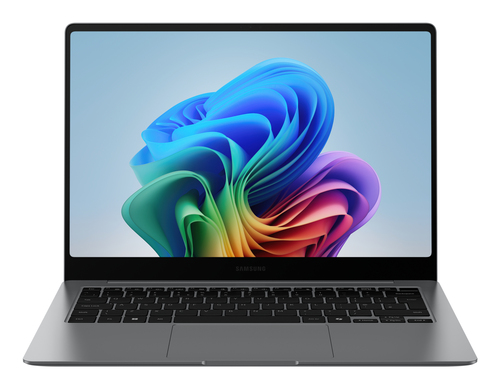
The Samsung Galaxy Book5 Pro 14-inch isn’t just another slim Windows laptop; it feels like Samsung trying to make the “Next-Gen AI PC” idea practical. On the product details page, you’ll see the Core Ultra 5 226V, 16GB LPDDR5x, 256GB SSD, Intel Arc Graphics 130V, and a 14" WQXGA+ AMOLED touchscreen. Buyers want AI-ready laptops, better battery life, and fewer dongles. In my experience, thin-and-light machines only matter if they’re actually useful all day. Let’s see if this one is. Also, verify specs and availability on the product details page.
What Actually Makes This Laptop Feel Fast?
The speed story here starts with the Intel Core Ultra 5 226V on Intel’s Series 2 platform, and that matters more than the name suggests. You’re getting a newer architecture, upgraded Intel Arc Graphics 130V, and an NPU that can reach up to 47 TOPS for AI tasks. In plain English, that usually means smoother multitasking, quicker app switching, and less waiting around when Windows, Office, and browser tabs are all fighting for attention.
For everyday work, this is the kind of setup that feels easy to live with. I’m talking about 20 browser tabs, a Teams call, a spreadsheet with too many formulas, and maybe some light photo editing on the side. It should handle all of that without turning into a space heater. If you want a different angle on portable work machines, another thin-and-light business laptop perspective is worth comparing because portability versus raw muscle is always the tradeoff. The Samsung Galaxy Book5 Pro details also show 16GB of LPDDR5x memory, which is a sensible amount for most people in 2026-style workflows. That said, 16GB and 256GB storage won’t be ideal for every creator, especially if you keep huge media libraries locally. Still, with AI tools showing up in productivity apps more and more, this spec sheet lands in a sweet spot: fast enough for most things, smart enough for modern AI.How the Display, Audio, and Webcam Improve Everyday Use
Let’s be honest: the display is often what makes a laptop feel premium long after the benchmark charts are forgotten. The Galaxy Book5 Pro 14-inch uses a Dynamic AMOLED 2X panel with a 2880 x 1800 resolution, a 16:10 aspect ratio, and vivid color that makes text, photos, and video look crisp. Add Vision Booster, reduced blue light, and Corning Gorilla Glass with DX anti-reflective coating, and you get a screen that works well indoors and outdoors. That’s huge for presentations, spreadsheets, streaming, and creative work.
The quad speakers with Dolby Atmos also help the daily experience feel more complete. You may not need headphones for every meeting, movie, or playlist, which is a nice change from the tinny sound many ultrabooks still ship with. Then there’s the webcam with Staggered HDR, which usually keeps your face balanced when you’re sitting in mixed lighting at home or in a coffee shop. Remote workers and students on Zoom will notice that immediately. For the official spec breakdown, Samsung’s official product page is the best source, and it confirms why this machine fits the premium Windows ultrabook trend without feeling flashy for no reason. In my view, that polish matters.Battery Life, Port Selection, and the Stuff That Saves Time
Battery life can make or break a 14-inch laptop, and Samsung is clearly aiming high here with a 63.1Wh battery and up to 21 hours of video runtime. Real-world use will vary, of course, but that’s still an impressive promise for a Windows machine this thin. Fast charging to about 41% in 30 minutes is even more useful than it sounds, because commuters and travelers rarely have a full afternoon to sit near an outlet. If you’re checking the product details page, this is one of the reasons it stands out.
The port mix is quietly excellent: two Thunderbolt 4 ports, HDMI, USB-A, a microSD slot, and a headphone/mic combo. That means fewer dongles, fewer lost adapters, and fewer “wait, do I have the right cable?” moments. Hybrid workers will appreciate that on day one. Wi-Fi 7 is another forward-looking perk, offering low latency and faster speeds for real-time collaboration. For readers who care about ecosystem workflow, Samsung device workflow features fit neatly here, and the Galaxy ecosystem productivity angle shows how premium laptop setup decisions can save time. Quick win: keep the charger in your bag, use USB-C for display plus power when possible, and let the laptop’s modern port mix reduce clutter. Not everyone needs Wi-Fi 7 yet, but buying ahead of the curve can make sense if you keep laptops for years.Samsung Ecosystem Features That Make the Laptop Feel Smarter
This is where the Galaxy Book5 Pro starts feeling less like a standalone laptop and more like part of a bigger system. Nearby devices, Multi Control, Storage Share, Quick Share, Phone Link, Second Screen, and Live Captions all sound technical, but the real benefit is simple: less friction. You can move photos from your phone without downloading them twice, drag files between devices, or use a Galaxy Tab as a second display while traveling. That’s the kind of daily convenience people usually don’t think about until they lose it.
If you’re already in the Samsung world, these features are very compelling. If you’re not, they still work, but they become much more useful when your phone and tablet are part of the same routine. I like that Samsung also includes Cocreator in Paint for quick graphics and presentation ideas, plus Copilot access through the dedicated key for fast AI help. The Galaxy device workflow integration makes the laptop feel smarter, not just faster. Live Captions are another quiet win, especially in noisy meetings or for accessibility. The bigger trend here is clear: people want one connected workflow, not a pile of separate devices. And this laptop leans into that beautifully.Honest Review: Who This Laptop Is Great For, and Who Should Think Twice
After looking at the Samsung Galaxy Book5 Pro 14-inch from a real-world angle, I’d call it a strong premium Windows option with a few understandable tradeoffs. The AMOLED touchscreen is gorgeous, the battery promise is excellent, the Core Ultra 5 platform feels modern, and the port selection is genuinely helpful. Adaptive palm rejection, Wi-Fi 7, and the polished Windows 11 Pro experience add to the sense that Samsung thought about daily use, not just spec sheets.
Still, the 256GB SSD may feel tight if you keep lots of media, VM images, or raw files locally. That matters. If you mainly browse, email, and stream, this is probably more laptop than you need, and premium pricing can be hard to justify. On the other hand, if you’re a traveling consultant, hybrid office worker, student in media or design, or a manager living in spreadsheets and meetings, the balance is strong. I’d recommend it most for Galaxy users and mobile professionals who want a compact, AI-ready machine with a display that genuinely impresses. As with other premium laptop tradeoff discussions, the key question is simple: will you use the premium features often enough to justify them?How to Set It Up for Day-One Productivity
Start by unboxing the Galaxy Book5 Pro, charging it fully, and completing Windows 11 Pro setup while connecting to Wi-Fi 7 if it’s available in your space. Then sign into your Microsoft and Samsung accounts so Copilot, Phone Link, Quick Share, and syncing work properly from the start. Next, run Windows Update, Samsung app updates, graphics driver updates, and BIOS/firmware updates; skipped updates are one of the most common mistakes people make. If you want the official feature list handy, the product setup and ecosystem page is useful while you configure everything.
After that, pair your Galaxy phone or Tab and test Multi Control, Storage Share, and Second Screen. It’s worth spending five minutes here. Adjust the display for comfort too—turn on Vision Booster outdoors, tweak brightness, and enable blue-light reduction at night. Finally, set power mode for travel versus plugged-in work, and organize Thunderbolt accessories early. If 256GB feels tight, keep frequently used files in cloud sync and use Quick Share for large transfers instead of emailing attachments. My quick advice: don’t skip Samsung account pairing, don’t ignore storage limits, and don’t forget that small setup choices usually save the most time later.Conclusion
So, is the Samsung Galaxy Book5 Pro 14-inch worth it? In my view, yes—for the right buyer. It combines modern AI-ready performance, a gorgeous AMOLED touchscreen, long battery life, and meaningful Galaxy ecosystem features in a compact Windows laptop that feels built for real life. That’s the part I like most. It’s clearly aimed at people who move between meetings, workspaces, and devices all day, and it does that job with a lot of polish. The design feels thoughtful, not gimmicky, which is refreshing in a market full of “AI” branding that doesn’t always mean much.
At the same time, the 256GB SSD and premium positioning deserve a hard look against your actual needs and budget. If you already live in the Samsung ecosystem, this machine starts making sense very quickly. If you don’t, it’s still attractive—but maybe not automatic. My advice is simple: review the specs, think about your workflow pain points, and compare this with what frustrates you in your current laptop. If the answer is battery, display, ports, and seamless device handoff, this one deserves a serious look. For buyers ready to move forward, start with the Samsung Galaxy Book5 Pro 14 product details page and see if it matches the way you actually work.Frequently Asked Questions
Common questions about Samsung Galaxy Book5 Pro (14", Core Ultra 5, 16GB)