Is the Samsung Galaxy Book5 Pro 14" the Smart AI Laptop Power Users Have Been Waiting For?
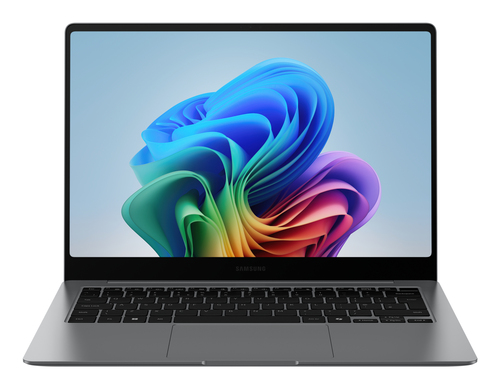
Laptop buyers have shifted toward AI PCs, slimmer builds, and all-day productivity, and the Samsung Galaxy Book5 Pro 14" lands right in that sweet spot. It pairs the Intel Core Ultra 5 226V, 16GB LPDDR5x, 256GB SSD, Wi-Fi 7, and a 14-inch WQXGA+ AMOLED touchscreen in a premium clamshell. I’d point hybrid workers and students to the Samsung Galaxy Book5 Pro 14" specs and availability, plus Samsung’s official website, because it feels fast, portable, and polished without workstation bulk. Let’s look at the AI, battery, display, and ecosystem perks.
Raw Performance: Why the Core Ultra 5 Feels Faster Than It Looks
At first glance, the Intel Core Ultra 5 in the Samsung Galaxy Book5 Pro 14" doesn’t sound outrageous, but that’s where the surprise starts. This Series 2 chip, with upgraded integrated graphics and an NPU rated up to 47 TOPS, is designed for the kind of mixed workload most people actually do: lots of browser tabs, video calls, office apps, AI-assisted writing, and the occasional light creative job.
In everyday use, 16GB of LPDDR5x memory keeps things from stuttering when Slack, Word, Spotify, and a few cloud tools are all open at once. Compared with older Intel U-series laptops or bare-bones productivity notebooks, this class of machine usually feels more alert when pressure builds. I’ve found that once you get used to an NPU-enabled laptop, simple AI tasks stop feeling gimmicky and start saving real time. That’s especially true with the dedicated Copilot key, which gives you quick access to on-device and cloud-based productivity features without hunting through menus. The Galaxy Book5 Pro 14" performance profile makes a lot more sense when you think in seconds saved, not just benchmark charts. In my experience, that’s where modern AI laptops earn their keep. Over a workweek, those tiny speedups stack up fast.Display, Audio, and Calls: The Everyday Stuff That Makes a Big Difference
The 14-inch Dynamic AMOLED 2X display is one of those features people often underestimate until they use it all day. With a 2880 x 1800 resolution, a 16:10 aspect ratio, vivid color, and smooth motion, the Samsung Galaxy Book5 Pro 14" feels great for reading, editing, and streaming alike.
The panel also uses reduced blue light for comfort, plus Vision Booster for outdoor visibility and anti-reflective Corning Gorilla Glass with DX, which helps a lot in bright rooms or near windows. Touchscreen support and multi-touch gestures make note-taking, quick zooming, and document navigation easier than they sound on paper. Then there’s the audio: quad speakers with Dolby Atmos add real depth to presentation calls, Netflix breaks, or a YouTube tutorial you’re half-watching between meetings. Staggered HDR improves webcam video, so remote interviews and client calls usually look cleaner and more vivid than the average laptop cam. If you want a deeper breakdown, the how the Galaxy Book5 Pro improves everyday use article goes into the day-to-day experience nicely. To be fair, if you live mostly in spreadsheets on an external monitor, the premium screen matters a little less. Still, good screen-plus-audio tuning reduces fatigue, and that matters when your laptop is open for eight or ten hours. It’s one of those quality-of-life upgrades you notice by Friday afternoon.Battery Life, Ports, and Wireless Speed: Built for Real-World Mobility
Mobility is where the Samsung Galaxy Book5 Pro 14" starts looking like a very practical premium laptop. The 63.1 Wh battery is rated for up to 21 hours of video runtime, and while real-world results always depend on brightness, workload, and Wi-Fi activity, that’s still the kind of number that can carry a full workday and then some.
Fast charging helps too: the 65W compact charger can get you to about 41% in roughly 30 minutes, which is handy for commuters, travelers, and anyone who forgets to plug in until the last minute. The port selection is refreshingly sensible, with two Thunderbolt 4 ports, HDMI, USB-A, a microSD card slot, and a headphone/mic jack—less dongle hunting, less clutter, more flexibility. Wi-Fi 7 and Bluetooth 5.4 make it feel current for cloud workflows, low-latency video calls, and larger file transfers, especially if your router can keep up. For the battery life, ports, and wireless details, it’s easy to see why this model fits people who move between desks, classrooms, and coffee shops. Pro tip: keep the compact charger in your bag instead of a separate brick; it’s one less thing to think about. In the end, portability isn’t just about weight. It’s about how little friction the laptop adds to your day.Samsung Ecosystem Features: The Hidden Convenience Advantage
If you already use a Galaxy phone, tablet, or watch, the Samsung Galaxy Book5 Pro 14" can feel a lot smarter than a typical Windows laptop. Nearby devices, Multi Control, Storage Share, Quick Share, Phone Link, and Galaxy Tab Second Screen all work together like little workflow shortcuts rather than flashy extras.
For example, Storage Share lets you browse phone files on the PC without downloading them first, which is genuinely useful for creators, marketers, and students pulling images or clips into a deck. Quick Share makes transfers fast and secure, while Multi Control lets you move a keyboard and mouse across your phone, Tab, or Smart Monitor with less fuss. The Samsung Galaxy Book5 Pro 14" ecosystem features are the kind of thing you might ignore at first, then miss badly once you’ve used them for a week. If you don’t own Samsung gear, the features are still helpful, just not the headline reason to buy. That said, if you’re already in the Galaxy ecosystem, the convenience can get addictive in a good way. As someone who’s seen plenty of small workflow snags waste time, I like that Samsung trims the little annoyances most people barely notice until they’re gone. That’s often what makes a premium laptop feel truly premium.Honest Review: Who This Laptop Is Great For, and Who Should Think Twice
My honest take? The Samsung Galaxy Book5 Pro 14" is a strong premium everyday laptop, especially if you care about AI-ready performance, an excellent AMOLED display, long battery life, a useful port selection, crisp webcam quality, and Galaxy ecosystem convenience.
It’s an easy fit for hybrid professionals, frequent travelers, university users, and anyone who wants a fast Windows 11 Pro machine that still looks polished in a meeting. The flip side is worth saying out loud: 256GB of SSD storage may feel tight if you keep large media libraries, local project folders, or big offline archives. Power users doing heavier video editing, large software builds, or demanding 3D work may also want more storage or a higher-tier configuration. Premium laptops aren’t always the best value for every buyer, either. Sometimes a cheaper machine covers the basics just fine. But if your day is mostly Zoom calls, documents, cloud apps, and a few AI tools, this model makes a lot of sense. If you game hard or store huge datasets locally, I’d probably look elsewhere. Otherwise, it’s one of those laptops that quietly does a lot right without making you think about it.How to Set It Up for Day-One Productivity
Getting the Samsung Galaxy Book5 Pro 14" ready is pretty straightforward, and a little setup goes a long way.
Step 1: charge it fully before first use and connect to Wi-Fi 7 if your router supports it. Step 2: sign into Windows 11 Pro, then update the system, Intel graphics, and Samsung utilities right away—skipping this is a common mistake that leads people to blame the laptop for startup or driver issues. Step 3: tune the touchscreen and touchpad settings, especially adaptive palm rejection, so accidental taps don’t slow you down. Step 4: pair your Galaxy phone or Tab with Nearby devices, then test Quick Share, Phone Link, and Multi Control so the ecosystem benefits are ready when you need them. Step 5: use the dedicated Copilot key and try simple AI tasks like summarizing notes or drafting emails. Step 6: adjust brightness, Vision Booster preferences, and audio for your normal workspace. Keep the Thunderbolt 4 ports open for fast accessories, use the microSD slot for light expansion, and set a weekly backup routine because 256GB fills faster than people expect. Once those basics are dialed in, this machine is easy to live with.Conclusion
So, is the Samsung Galaxy Book5 Pro 14" the smart AI laptop power users have been waiting for? In a lot of ways, yes. It combines AI-ready performance, a gorgeous AMOLED display, strong battery life, and useful connectivity in a lightweight package that feels built for modern work.
The biggest wins are easy to summarize: fast enough for heavy multitasking, pretty enough for content work and streaming, and practical enough for office life, classes, and travel. Galaxy users get an extra boost from the ecosystem features, while the port selection and battery make the laptop flexible even if you’re not deep into Samsung gear. Of course, premium doesn’t mean perfect. The 256GB SSD is the main spec that may push some buyers toward alternatives, especially if they store lots of local files. Still, for most readers who want a refined Windows 11 Pro machine that feels current and thoughtfully designed, this is a compelling choice. I’d compare your current workflow against what this laptop offers, then decide whether the time saved is worth the upgrade. If it is, the Samsung Galaxy Book5 Pro 14" details page is the place to start.Frequently Asked Questions
Common questions about Samsung Galaxy Book5 Pro (14", Core Ultra 5, 16GB)