Is the HP ProBook 440 G11 the Right AI Business Laptop for Hybrid Work?
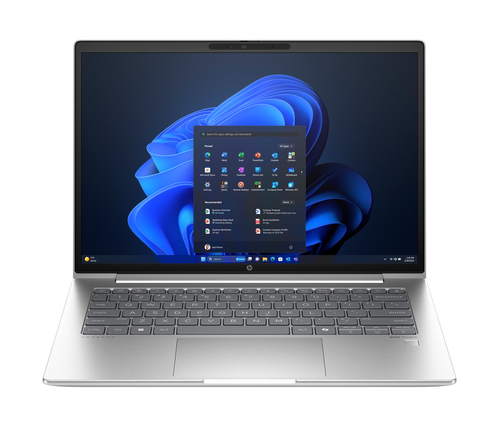
Hybrid work has changed what people expect from a business laptop: lighter carry, faster logins, better battery life, and enough performance for meetings, spreadsheets, and multitasking without constant lag. The HP ProBook 440 G11 is a 14-inch AI PC for growing businesses, with commercial-grade durability, multilayer endpoint security, and an easy-upgrade design. See HP ProBook 440 G11 specs and configuration and HP’s broader business laptop lineup. With the Intel Core Ultra 5 125U, 16 GB DDR5 memory, and 256 GB PCIe NVMe SSD, it feels like a balanced workhorse, not a flashy creator machine—usually the kind that just gets work done.
Why the Core Ultra Platform Makes Everyday Work Feel Easier
The Intel Core Ultra 5 125U is the kind of processor that makes sense when your day is packed, not cinematic. With 12 cores, 14 threads, and Turbo Boost up to 4.3 GHz, it gives the HP ProBook 440 G11 enough headroom for browser tabs, Teams calls, email, and documents all at once. In my experience, that matters more than benchmark bragging rights for most business users.
The Intel Core Ultra-powered ProBook 440 G11 also leans into the AI PC idea in practical ways: background noise reduction, smarter video calling, and on-device efficiency features that usually make the workday feel smoother. Windows 11 Pro adds a real business edge too, especially for manageability, security, and remote work. Compared with consumer laptops, this setup feels more restrained but more trustworthy over a full day. I’ve seen that play out when someone is juggling finance dashboards, CRM tabs, and a Zoom meeting at the same time. One small but important note: 16 GB DDR5-5600 memory is a sweet spot for many professionals, although power users with heavy VMs or large data sets should think carefully about future upgrade needs. If you want a similar productivity-first perspective, the multitasking angle in our AI business laptop comparison notes lines up pretty well with what this machine is trying to do.The Display, Keyboard-Focused Design, and Why 14 Inches Still Works
The 35.6 cm (14") WUXGA 1920 x 1200 IPS display is one of those specs that sounds modest until you use it all day. That 16:10 aspect ratio gives you more vertical space for documents, spreadsheets, and web apps than a standard 1080p panel, which is a subtle productivity win.
During long work sessions, especially when you keep jumping between browser tools and local apps, that extra room helps more than you’d think. The clamshell silver design looks understated and professional, and honestly, that’s a good thing. It won’t scream for attention, and it probably won’t look dated in a few years either. The HP ProBook 440 G11 14-inch business laptop also hits a nice portability middle ground for people moving between home, office, and client sites. I’ve always preferred 14-inch systems when I need something that fits a café table or airline tray without feeling cramped. Quick Win: pair the WUXGA display with a clean Windows taskbar setup and snap layouts, and you get a lot more usable space for free. Sure, premium ultrabooks can offer better color or thinner bezels, but they’re not always the better choice for teams that care more about practicality than looks. That tradeoff is worth thinking about, and the more portable designs discussed in our thin-and-light hybrid work guide make the comparison easy to understand.Storage, Battery Life, and Connectivity That Fit a Busy Workday
The 256 GB PCIe NVMe SSD gives the HP ProBook 440 G11 fast boots, quick app launches, and a generally responsive feel. That said, 256 GB can get tight if you keep lots of local media, large project files, or offline datasets.
For business use, though, it’s a reasonable compromise because cloud storage and managed IT workflows are more common now. The 56 Wh battery and 65 W charging fit travel days, meetings, and café work pretty well, even if heavy workloads and bright screens will cut runtime. The HP ProBook 440 G11 battery and connectivity story is strong too: Wi-Fi 6E, Bluetooth 5.3, and Gigabit Ethernet give hybrid workers a solid mix of modern wireless and wired reliability. In crowded offices, that wired LAN port can be a lifesaver when Wi-Fi gets noisy or unstable. This laptop fits current market trends toward thinner business systems that still keep legacy-friendly ports, which I think is smarter than chasing thinness for its own sake. Premium options sometimes promise better endurance, sure, but the real question is whether they solve your actual workflow. For teams comparing endurance-focused systems, the battery and port balance in our hybrid work laptop roundup shows why this approach still makes sense.Security, Durability, and Upgradeability for Growing Teams
Multi-layer endpoint security matters when your business handles customer data, finance files, or internal documents. Honestly, that’s usually more important than a flashy spec sheet.
The commercial-grade durability angle is just as practical: this is the type of laptop built for desks, commutes, and daily packing, not delicate showroom handling. I like the easy-upgrade design because it can extend the life of the machine and lower replacement costs, which IT teams and budget-conscious buyers both appreciate. It’s also one of those features people forget about until they need more RAM or storage later. Pro Tip: ask whether your deployment plan needs more SSD space up front, because local storage is one of the easiest things to underestimate. Small businesses onboarding new employees, field staff needing a dependable laptop, and managers who want a secure machine that won’t feel outdated quickly all benefit here. Consumer laptops may look sleeker, but they often skip serviceability and that gets expensive later. In a year when refresh cycles are getting longer, durability plus upgradeability is a smart combination, and it lines up with the practical thinking behind our business laptop serviceability discussion.Honest Review: Strong Everyday Performer with a Few Tradeoffs
The HP ProBook 440 G11 is a strong fit for professionals who want reliability, modern performance, and business-class features without overspending on top-tier specs. The pros are easy to see: responsive Core Ultra performance, Windows 11 Pro, good connectivity, a 14-inch WUXGA display, Wi-Fi 6E, Ethernet, and upgrade-friendly construction. That said, the tradeoffs are real.
The 256 GB storage limit may feel tight, integrated Intel Graphics won’t suit heavy creative work or gaming, and users who want a premium visual experience may want a brighter or higher-resolution panel. Still, for HR teams, sales managers, admins, consultants, and hybrid workers who mostly live in browser apps, Office, video calls, and cloud tools, it’s a sensible fit. From an experienced-IT perspective, this is the kind of system I’d recommend when dependable daily productivity matters more than flashy specs. It’s usually a better fit than many consumer laptops for managed environments, though some users will want a larger screen or more storage. My take? Good buy for business users, especially with cloud storage or an IT-managed workflow, but not the best choice for media-heavy creators or anyone who needs massive local capacity.How to Set Up the ProBook 440 G11 for Day-One Productivity
Start by unboxing the laptop, connecting the 65 W charger, and letting it reach a full charge before you do much else. Then complete Windows 11 Pro setup, sign in with a work account if needed, and connect to Wi-Fi 6E so updates move quickly.
After that, run Windows Update and HP support tools to pull down drivers, firmware, and security patches. Next, adjust display scaling, power mode, and battery settings for your work style—balanced mode is usually the best starting point. Set up OneDrive, SharePoint, or your company’s cloud storage so the 256 GB SSD doesn’t fill up with files that belong elsewhere. Install core apps, pin them to the taskbar, and configure multitasking shortcuts to make the WUXGA screen work harder for you. Finally, review security settings, including BitLocker, biometric options if available, and endpoint protection policies. Common Mistakes to Avoid: don’t overload local storage, don’t skip updates, and don’t assume battery settings are optimized out of the box. I’ve done dozens of business laptop setups, and those three mistakes cause most of the pain. A little patience on day one saves a lot of support tickets later.Conclusion
The HP ProBook 440 G11 is built for people who need a dependable business laptop that balances performance, security, portability, and future flexibility. The standout strengths are easy to spot: Core Ultra 5 processing, 16 GB DDR5 RAM, a WUXGA display, Wi-Fi 6E, Ethernet, Windows 11 Pro, and an upgrade-friendly design.
The main tradeoff is still the same—storage is modest, and this machine is about work efficiency rather than luxury extras. But if your day is mostly meetings, documents, CRM tabs, and shared files, that’s not really a problem. Think about what matters most in your week: faster meetings, fewer slowdowns, easier IT management, and a laptop that can adapt as needs grow. That’s where this model makes sense. I’d suggest reviewing the product page, comparing it with your current workflow, and asking whether a practical 14-inch AI business laptop fits better than a flashier alternative. If you want a machine that usually does the boring-but-important stuff well, the HP ProBook 440 G11 details page deserves a serious look.Frequently Asked Questions
Common questions about HP ProBook 440 G11 Intel Core Ultra 5 125U Laptop 35.6 cm (14") WUXGA 16 GB DDR5-SDRAM 256 GB SSD Wi-Fi 6E (802.11ax) Windows 11 Pro AI PC Silver