Is the Acer TravelMate P6 the Best Thin-and-Light Business Laptop for Hybrid Work?
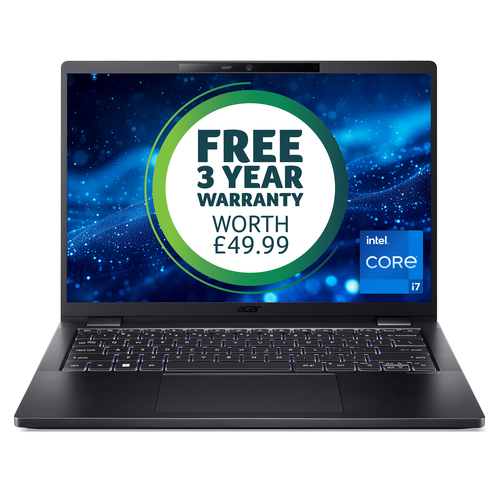
Mobile work has changed fast, and most of us want something lighter than a traditional notebook without giving up performance, security, or battery life. The Acer TravelMate P6 TMP614-53 aims right at that need. see the product details here With an Intel Core i7-1355U, Intel Evo Design, 14-inch WUXGA 16:10 IPS display, 16GB LPDDR5, 512GB PCIe NVMe SED SSD, Windows 11 Pro, and Wi-Fi 6E, it looks promising. I’ve seen plenty of business laptops look good on paper and disappoint in the field—this one is a little different. The real question is value, not just specs.
What Makes the TravelMate P6 Feel So Fast and Efficient?
At the heart of the TravelMate P6 is the Intel Core i7-1355U, a 10-core chip that usually balances speed and efficiency nicely. Add Intel Evo Design, and you typically get quicker wake times, better responsiveness, and battery behavior that feels more consistent in day-to-day work. For hybrid professionals, that matters more than benchmark bragging rights.
The 16GB LPDDR5 memory is a strong fit for multitasking—email, spreadsheets, browser tabs, video calls, and light content work all at once without the machine feeling bogged down. The 512GB PCIe NVMe SSD keeps boot times short, while the SED security layer adds peace of mind if you handle sensitive files. Intel Iris Xe Graphics is enough for presentations, streaming, and standard office visuals. check current configuration options Quick Win: if you’re upgrading from an older 8GB laptop, the jump in responsiveness is often night and day. And that’s the key here: this isn’t a gaming laptop or a heavy creator machine, but that’s not the point. It’s built for fast, dependable work in a thin chassis. In my experience, a modest-looking spec sheet can still become a very productive daily driver when the hardware is tuned for business tasks. If you’re also comparing broader workstation options, browse our business laptop category and read our hybrid work guide.Why the 14-Inch WUXGA Display and Slim Design Work So Well on the Move
A 14-inch WUXGA 1920 x 1200 IPS display with a 16:10 aspect ratio gives you more vertical space than a standard 16:9 screen, and that’s a real productivity boost. Documents scroll less. Dashboards breathe a little. Web apps feel less cramped when you’re bouncing between windows all day. The SlimBezel design helps keep the footprint compact, too, so the laptop stays easy to carry without making the screen feel tiny.
The black clamshell finish fits right into professional spaces—nothing flashy, just clean and understated. I’ve used enough IT gear to remember when thin laptops meant compromised ports or weak panels, but that tradeoff has improved a lot in recent years. These days, a design like this lines up with current market trends: portable, polished, and built for mixed work environments. browse the TravelMate P6 details I’d still say premium ultrabooks can be overpriced if all you need is basic browsing, but for frequent travelers and hybrid workers, the slim design and better screen ratio often justify the spend. Think airport lounges, client meetings, classroom lectures, sales presentations, or coworking spaces. The comfort factor is real, and so is the reduced eye strain. For a quick side-by-side view, see related thin-and-light models.How the Battery, Connectivity, and Security Features Help in Daily Work
A 65Wh lithium-ion battery paired with an efficient U-series processor and Evo tuning usually gives you a better shot at making it through a full workday. Not always, of course—battery life depends on brightness, network conditions, and workload—but the foundation is solid. read more product specs here
Wi‑Fi 6E and Bluetooth 5.1 are the kind of connectivity basics that matter more than people realize. Fast networks, stable video calls, wireless headsets, mice, and crowded office environments all benefit. Then there’s Windows 11 Pro, which many business users prefer for stronger device management, work-friendly controls, and security features that IT teams actually use. The SED SSD is another nice touch if you deal with finance, consulting, healthcare-adjacent work, or client files that shouldn’t be treated casually. Picture this: you commute in, dock at the office, then jump into a video meeting from home later that night. That’s normal hybrid work now. Expert Advice: carry the charger on heavier days, keep firmware updated, and use battery saver modes when traveling. These are the kinds of features that matter more than flashy marketing when work is on the line. If you want a deeper dive into wireless setup, check our connectivity tips.Who Should Buy the TravelMate P6—and Who Probably Shouldn’t?
The TravelMate P6 is a strong fit for executives, consultants, sales teams, remote workers, and students in professional programs who value portability plus business-grade features. If you’re comparing it with bulkier 15.6-inch laptops, sure, those can give you more screen space—but they usually give back some portability, too. And in my experience, that tradeoff gets old fast during conference season or busy Q4 business travel.
On the other hand, if your day is mostly heavy video editing, 3D modeling, or gaming, you’ll probably want a different class of machine. Premium alternatives can be tempting, but they’re not always worth it if your work is mainly office apps, web tools, meetings, and documents. explore the official product page That said, I wouldn’t call this the universal answer for everyone. It’s a focused, efficient laptop for people who need to stay light on their feet and still get serious work done. In short, this laptop is less about wow-factor and more about dependable professional use. In my experience, the best business laptop is the one you stop noticing because it just works.Honest TravelMate P6 Review: Strong Everyday Performance with a Few Tradeoffs
The Acer TravelMate P6 makes a very good first impression, and honestly, it keeps that momentum in daily use. The lightweight form factor, Intel Core i7-1355U performance, 16GB LPDDR5 memory, fast SSD storage, Windows 11 Pro, and 16:10 WUXGA display all work together to make business tasks feel smooth and less cramped. It’s especially well suited for commuting, office work, client visits, remote meetings, and travel-heavy schedules.
That said, I wouldn’t call it the right answer for everyone. It’s not built for demanding creative workloads or gaming, and buyers who want a larger display or workstation-level power should look elsewhere. Performance is snappy for business apps and reliable for hybrid work, but it’s not the kind of laptop you buy just for raw horsepower. My take? Great for professionals who care about portability, security, and battery efficiency; less ideal for users who prioritize maximum screen size or specialized graphics performance. Premium laptops can be worth it when they save time and reduce friction—but not if the added cost doesn’t match the workload.How to Set Up the TravelMate P6 for a Smooth First Week
Start simple. Step 1: unbox the laptop, check the charger and accessories, and confirm the system specification matches what you ordered. Step 2: power on, connect to Wi‑Fi 6E if it’s available, and finish Windows 11 Pro setup. Step 3: install updates right away—Windows Update, drivers, and Acer utilities—because first-day patching often prevents weird issues later.
Step 4: sign in with Microsoft and business accounts, then set up OneDrive or your company storage for backup. Step 5: configure security basics like sign-in options, BitLocker policies if applicable, and screen lock timing. Step 6: adjust display scaling, battery settings, and notification preferences so the laptop feels comfortable, not noisy. Common Mistakes to Avoid: skipping updates, overloading startup apps, and ignoring backup settings. Before the week gets busy, test battery life, webcam and mic quality, and Wi‑Fi stability. That way you can tweak settings early instead of troubleshooting in the middle of a deadline. It’s the kind of setup routine I’ve used for years, and it saves headaches.Conclusion
The Acer TravelMate P6 feels like a focused business tool, not a flashy all-rounder—and that’s exactly why it makes sense for a lot of hybrid professionals. Its biggest strengths are portability, Intel Evo efficiency, strong everyday performance, Windows 11 Pro, and a display that’s genuinely useful for work. Those are the things that help you stay productive without carrying unnecessary bulk. compare specs and buy here Also, if you want to learn more about Acer’s broader lineup, visit Acer’s official website.
If you want the lightest possible work machine with dependable specs, this laptop is easy to recommend. If you need workstation power, look elsewhere. Modern hybrid work has made battery life, wireless reliability, and comfort more important than ever, and the TravelMate P6 checks those boxes well. Premium options aren’t always worth it, but this one can be—especially if your day is mostly meetings, documents, and travel. Sometimes the best laptop choice is the one that quietly handles the boring parts of the day.Frequently Asked Questions
Common questions about Acer TravelMate P6 TMP614-53, 14" WUXGA IPS SlimBezel, Intel Core i7-1355U, 16 GB LPDDR5, 512GB PCIe NVMe SED SSD, 3 Years Carry in, Windows 11 Pro